Last Updated: November 1, 2026
Quick Summary
The best wedding photo collection tools are browser-based, so guests scan a QR code or open a link and upload straight from their phone with no app store, account, or download. Kameratalk, Fotify, GuestCam, Guestpix, and WedUploader all run app-free, and Kameratalk suits privacy-first couples who want a private gallery.
- Browser-based uploads remove the download, the biggest failure point in wedding photo collection.
- Both iPhone and Android cameras read QR codes natively, so guests install nothing.
- Test the guest flow on an iPhone and an Android phone using cellular data, not venue Wi-Fi.
- Print the plain web link next to the QR code as a fallback for less tech-confident guests.
- A private gallery with an access code is generally safer than a public link anyone can forward.
Table of Contents
- Quick Comparison: Best Wedding Photo Collection Tools Without an App
- Wedding Photo Sharing Without an App: How Browser-Based Uploads Work
- QR Code for Wedding Photos: Scan, Upload, Done
- How to Collect Wedding Photos from Guests: A Step-by-Step Setup
- Shared Wedding Photo Album: Organization, Slideshows, and Live Displays
- Pricing, Free Plans, and Upload Limits Compared
- Privacy, Consent, and Image Ownership Under GDPR
- Upload Reliability, Accessibility, and Moderation at the Venue
- Which Wedding Photo Collection Tool Fits Your Guest List?
- Frequently Asked Questions
Quick Comparison: Best Wedding Photo Collection Tools Without an App
The best wedding photo collection tools are browser-based, meaning guests scan a QR code or open a link and upload straight from their phone. No app store, no account, no download. That’s the problem this comparison addresses.
The short answer depends on your priorities: some tools suit the simplest guest flow, others suit heavy video or existing cloud storage, and Kameratalk is one option for couples who want a private, browser-based gallery without app friction. For a deeper roundup of the best wedding photo collection apps, see our dedicated guide.
Here’s the thing most guides get wrong: they compare features but never test the guest experience. A tool with unlimited storage is useless if your aunt can’t figure out how to upload.
What the Comparison Table Covers
The table below scores each option on the factors that actually decide a wedding: whether guests need an app, how they access the gallery, what they can upload, and where the photos end up.
| Tool | App Needed? | Guest Access | Uploads | Where Photos Go | Best For |
|---|---|---|---|---|---|
| Kameratalk | No | QR code or link | Photos and video | Private gallery | Privacy-first couples |
| Fotify | No | QR code, no login | Photos | Hosted gallery | Fastest guest flow |
| GuestCam | No | Link or QR | Original-quality photo and video | Hosted gallery | High-volume events |
| Guestpix | No | QR code | Photos and video | Hosted gallery | All-in-one wedding setup |
| WedUploader | No | Link | Photos | Your Google Drive | Drive users |
Pricing is deliberately left out of this table because the supplied data doesn’t verify current plans for most tools. We cover what we can confirm in the pricing section below.
Wedding Photo Sharing Without an App: How Browser-Based Uploads Work
Browser-based photo sharing means guests open a web link in Safari or Chrome and upload directly, with no app installed. The phone’s camera and photo library are already there. The tool just needs a page that accepts the file.
That single design choice removes the biggest failure point in wedding photo collection: the download. A guest who has to install an app at 9pm after two glasses of wine will not install the app.
Here’s how the flow works in practice:
- You create an event and get a QR code and a web link.
- You print the QR code on table cards or share the link in a group chat.
- A guest scans or taps, lands on a mobile web page, and picks photos from their camera roll.
- The upload runs in the background over Wi-Fi or cellular data.
No account creation, no password, no app store detour. The guest experience is the whole product.
A common mistake is assuming guests will remember to upload later. They won’t. The upload has to happen at the table, in the moment, while the cake is being cut.
QR Code for Wedding Photos: Scan, Upload, Done
A QR code for wedding photos is a printed square that opens your upload page when scanned with a phone camera. That’s it. Both iPhone and Android cameras read QR codes natively now, so there’s nothing for the guest to install.
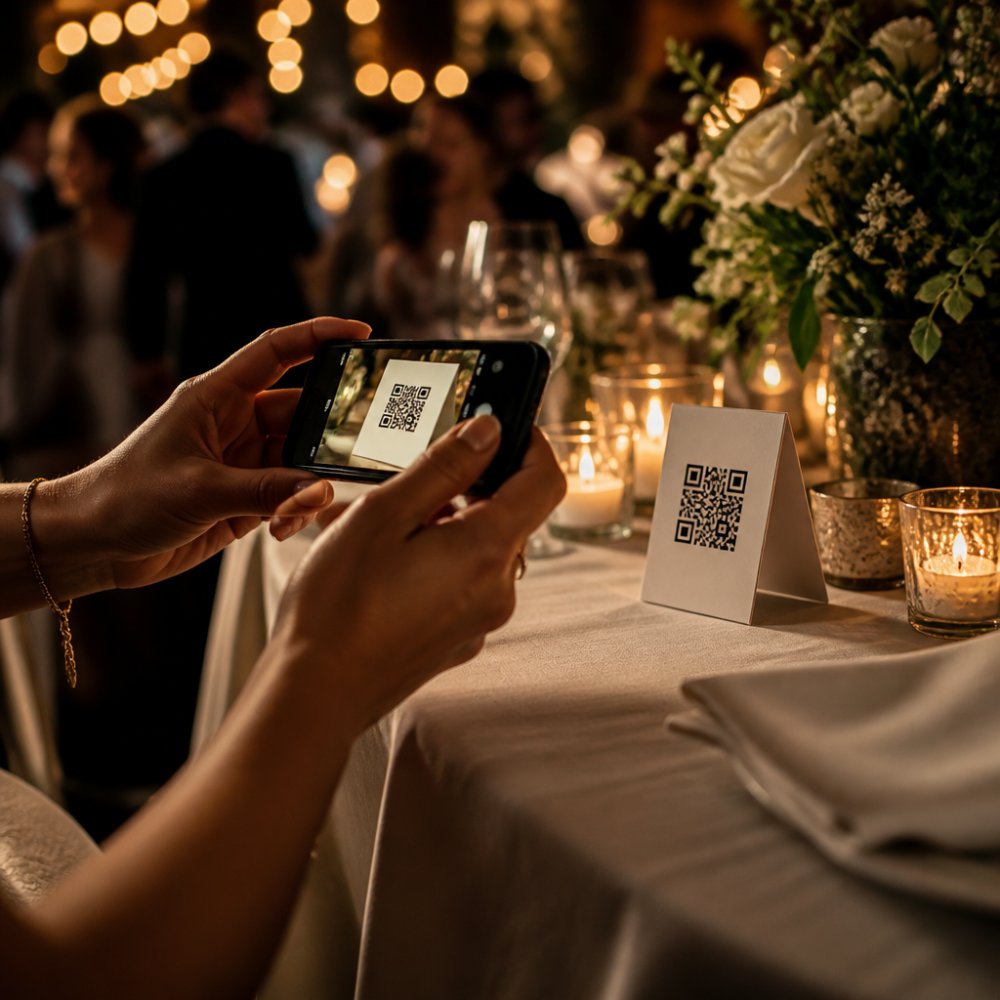
The execution matters more than the code itself. Print it large, put it on every table, and add one line of instruction: „Scan to share your photos.“ Skip the paragraph of explanation. Guests scan when the action is obvious and abandon when it isn’t.
Watch out: a QR code printed too small or placed flat under a candle gets scanned by nobody. Test your printed cards in the actual venue lighting before the day.
For less tech-confident guests, the web link is the backup. Type it into a group chat and anyone who won’t scan can still tap it.
How to Collect Wedding Photos from Guests: A Step-by-Step Setup
Collecting wedding photos from guests takes about 30 minutes of setup if you do it in the right order. Here’s the sequence we’d follow.
- Pick the tool and create the event. Set the event name and date now, not the night before.
- Generate the QR code and the upload link. Save both. For a full walkthrough, see how to create a photo sharing link for events. You’ll need the link for digital invites and the code for print.
- Design the table cards. One QR code, one short instruction, nothing else.
- Test the guest flow on two phones. Use an iPhone and an Android device, on cellular data, not just venue Wi-Fi.
- Share the link in the group chat a day before, so early arrivals know it exists.
- Brief one person to point guests to the cards during the reception.
- Check the gallery mid-event and confirm uploads are landing.
The step most couples skip is number four. Test on cellular data. Venue Wi-Fi is often the weakest link in the room.
Shared Wedding Photo Album: Organization, Slideshows, and Live Displays
A shared wedding photo album is a single gallery where every guest upload lands in one place, sorted by time or contributor. The value isn’t just storage. It’s that you stop hunting through five WhatsApp threads and three camera rolls for the same evening.
Organization is where tools separate. The better ones group uploads chronologically, let you bulk download originals, and give you a private gallery link you control. Weaker ones dump everything into one undated pile.
Live displays and slideshows are the crowd-pleaser. A screen showing new guest photos as they arrive keeps people contributing, because they can see their shot appear. Not every tool supports a live display, so check before you commit if that’s on your list.
Photo and video support varies too. Some tools accept video uploads, some cap file size, and some compress on the way in. If you care about photo resolution and download originals, confirm the tool keeps full-quality files rather than resizing them.
A pre-event checklist helps couples prepare:
- QR code printed and tested in venue lighting
- Web link shared in group chat
- Two phones tested on cellular data
- One guest briefed to point people to the cards
- Gallery access confirmed for the couple
- Bulk download tested before the event
Run that list and you’ve removed most of the reasons guest photo uploads fail.
Pricing, Free Plans, and Upload Limits Compared
Most wedding photo collection guides turn this section into a price table and call it done. That is the wrong frame. The number on the plan page is rarely what decides whether guest uploads succeed; the constraint that bites is the interaction between guest count, file size, and how long the gallery stays live. Since verified EUR pricing for most tools is not available to us, we will not invent figures. Instead, here is the framework we would use to read any plan page in under five minutes, plus the specific limits that cause mid-reception failures.
The four limits that actually matter
Every plan page lists dozens of features. Four of them decide whether your wedding upload works:
- Upload cap per event. Is the limit a number of photos, a number of guests, or a total storage figure? A cap expressed in guests is easier to plan against than one expressed in gigabytes, because you know your guest list but you do not know how many shots each person will take.
- Per-file size limit. A phone photo is typically a few megabytes; a short video clip can be tens of megabytes. If the plan caps individual files low, video uploads will fail silently at the table and the guest will assume the tool is broken.
- Compression behavior. Some tools resize images on upload to save storage. If the plan promises „originals,“ confirm whether that means the full-resolution file or a high-quality re-encode. This is the single most common mismatch between what couples expect and what they download after the event.
- Gallery retention period. How long after the wedding does the gallery stay online? A plan that expires in 30 days is fine if you download everything in week one; it is a problem if you plan to sort through photos on a rainy weekend two months later.
Reading a free plan honestly
A free tier is a trial, not a plan. The pattern most couples hit is that a free tier covers a small guest list comfortably and a 150-guest wedding not at all. Before you commit to a free plan, do one calculation: multiply your guest count by a conservative three uploads per guest, then compare that to the plan’s cap. If the number is close, assume you will exceed it and budget for the paid tier from the start. Starting on a free plan to test the guest flow is sensible; relying on it for the event is not.
A free plan that runs out mid-reception is worse than no plan at all, because guests who try to upload after the cap is hit get an error and stop trying. If your guest list is large, treat the free tier as a test environment only.
Per-event versus subscription
Two pricing models dominate: a one-time per-event fee and a recurring subscription. For a single wedding, per-event pricing is almost always the better fit, because you are not paying for months of storage you will not use. Subscriptions make sense only if you expect to run multiple events (an engagement party, a rehearsal dinner, a second celebration) on the same account. Ask directly which model applies before you compare headline numbers, because a low monthly figure can cost more over a year than a single event fee.
What to ask before you pay
- Does the plan cap photos, guests, or storage, and which cap will I hit first?
- Are originals preserved, or are images re-encoded on upload?
- How long after the event does the gallery remain accessible, and can I extend it?
- Is there a bulk download option, and does it count against any limit?
- What happens to uploads if the cap is reached mid-event?
A plan that answers these five questions clearly is worth more than one with a lower headline price and vague limits. The right question is not which plan is cheapest; it is which plan covers your guest list, your file types, and your download timeline without a surprise on the night.
Privacy, Consent, and Image Ownership Under GDPR
Privacy is the section most comparisons skip, and it’s the one that matters most for family photos. Under the GDPR, wedding guests are identifiable people in images, and you’re handling their personal data when you collect and store those photos.
The practical points:
- Consent: tell guests clearly that photos will be collected in a shared album. A line on the table card does this.
- Image ownership: you should know who holds the photos and whether the tool uses them for anything else. Read the terms.
- Storage location: where the servers sit matters to many couples. Ask the provider directly rather than assuming.
- Access control: a private gallery with an access code is generally safer than a public link anyone can forward.
The GDPR applies to how you handle guest images whether or not you run a business. For practical guidance, see our article on secure ways to share wedding photos online. A shared album is data processing. If you’re weighing the obligations, read is GDPR compliance worth the extra cost for events. Treat it that way and you’ll make better tool choices.
Upload Reliability, Accessibility, and Moderation at the Venue
This is the section most comparisons skip, and it is where weddings are actually won or lost. A tool can look perfect in a feature table and still fail at 9pm in a stone-walled reception hall with 150 phones competing for one Wi-Fi access point. Here is what to plan for, mechanism by mechanism.
Connectivity: plan for the worst network in the room
Venue Wi-Fi is usually a single consumer router sized for a restaurant, not for a hundred simultaneous uploads. Cellular coverage varies by building: thick walls, basements, and rural venues can drop to one bar or nothing. The practical rule is to assume neither option is reliable on its own and design for both.
- Test on cellular data, not venue Wi-Fi. Walk the room on the day of setup and note where signal drops. Table cards placed in a dead zone will not be scanned.
- Prefer photos over video at the table. A photo uploads in seconds on a weak signal; a video clip can stall for minutes and time out. If video matters to you, tell guests to upload clips later in the evening when the network is quieter, or accept that some will fail.
- Check retry behavior. A good browser-based tool retries a failed upload automatically and shows the guest a clear status. A tool that silently drops a failed upload is the worst outcome, because the guest believes the photo was shared and it never arrives.
- Watch for the offline case. If a guest loses signal mid-upload, does the page hold the file and retry when the connection returns, or does it discard it? Ask this before the event; it is rarely on a feature page.
The cheapest reliability upgrade is a printed fallback: put the plain web link next to the QR code on every table card. A guest who cannot get the QR to scan, or whose camera app is slow, can type the link. Two paths to the same upload page beat one.
Accessibility for less tech-confident guests
The guest who struggles is rarely the one you expect. It is the grandparent whose phone camera does not surface a QR banner, the guest on an older Android device, or the person who has never uploaded a file from a browser. Design for them and everyone benefits.
- One instruction, large type. „Scan to share your photos“ at a readable size beats a paragraph of steps. If the card needs explaining, it is too complex.
- QR code plus typed link. The link is the accessibility fallback. Put it in the group chat and on the card.
- No account, no password. The moment a guest is asked to create a login, a meaningful share of them stop. Browser-based tools that skip accounts are the accessible choice.
- Test with a real person, not just a device. Hand the card to someone who is not confident with phones and watch where they hesitate. That hesitation is your design brief.
Moderation and unwanted uploads
An open upload link is a public door. At a wedding the risk is usually low, but it is not zero: a forwarded link, a prank, or an accidental upload from the wrong camera roll can land in your gallery. The controls to look for:
- Access code or private link. A gallery that requires a code, or a link that is not guessable, keeps casual outsiders out.
- Approval queue. Some tools let the host review uploads before they appear in the shared album. This is the strongest moderation control and worth confirming before the event.
- Removal controls. You should be able to delete an upload from the gallery yourself, without contacting support.
- Contributor visibility. Knowing which guest uploaded which file helps you trace and remove a problem upload quickly.
A pre-event reliability checklist
- Walked the venue and noted weak-signal zones
- Tested the guest flow on an iPhone and an Android phone on cellular data
- Confirmed the tool retries failed uploads and shows status
- Printed both QR code and typed link on every table card
- Confirmed access code or private link is enabled
- Confirmed approval queue or removal controls are available
- Briefed one person to help guests who hesitate
Run that list and you have removed most of the reasons guest uploads fail. The remaining variable is the tool itself, which is why testing the flow on two phones before the day is non-negotiable.
Which Wedding Photo Collection Tool Fits Your Guest List?
The right tool depends on your guest list and your priorities, not on a feature checklist. If you’re considering a dedicated gallery, read is private photo gallery software worth it for weddings. Here’s how we’d decide.
Frequently Asked Questions
What is the best way to collect wedding photos from guests?
A browser-based wedding photo collection tool with QR code access works best for most celebrations. Guests scan a code, choose photos or videos from their phone, and upload without installing anything. Look for original-resolution downloads, a private gallery, and moderation controls. Several browser-based services support app-free uploads, so compare upload limits and privacy settings before you commit.
Can guests upload wedding photos without downloading an app?
Yes. Browser-based wedding photo sharing without an app lets guests open a web link or scan a QR code, then upload directly from the phone’s camera roll. No account creation is needed on most services. This matters for older relatives and less tech-confident guests who may abandon an app install. Test the link on both iPhone and Android before the wedding day so the flow is familiar.
How do QR codes work for wedding photo sharing?
A QR code for wedding photos is simply a printed link. You generate it in your chosen tool, place it on tables, invitations, or a welcome sign, and guests scan it with their phone camera. The browser opens the upload page, and they select photos or videos. Keep a short written URL next to the code for guests whose camera app does not scan reliably, and test the code at the venue beforehand.
Are wedding photo-sharing apps free to use?
Some services offer a free plan, often with limits on uploads, storage duration, or video support. Others charge a one-time event fee. Check each provider’s website for current limits and pricing. Read the storage terms carefully, because a free tier may expire before your first anniversary.
How do I share wedding photos with guests privately?
Use a private gallery with an access code rather than a public link. Ask providers where they host data, what the retention period is, and whether you can moderate or remove uploads. Share the gallery link only with confirmed guests, and download originals in bulk to your own storage after the event. That way you control who sees the photos and for how long.
Your guest list is the constraint that decides this. A 150-guest wedding with a weak venue network needs a tool that uploads over cellular data and doesn’t ask anyone to install anything. Kameratalk is built for exactly that: browser-based guest uploads, QR code and link access, a private gallery, and a free plan to start on. Get started with Kameratalk and collect every guest photo without a single app download.