Last Updated: October 22, 2026
Quick Summary
To evaluate used lenses, inspect the mount, glass, rings and electronics in a fixed ten-minute sequence, then confirm with real test shots. Shine a torch through the barrel to catch fungus, haze or separation, and walk away from any of those three. Clean glass, smooth mechanics and sharp files mean you can buy with confidence.
- A full in-person inspection pass takes about ten minutes and runs from mount to test shots.
- Loose internal dust is normal, but fungus, haze or separation is a defect worth walking away from.
- Shoot a plain bright surface at f/11 or f/16 and boost contrast to reveal internal flaws.
- Confirm mount, sensor coverage, autofocus, aperture control and stabilization before paying.
- A scuffed barrel with perfect optics beats a pretty lens with a soft corner.
Table of Contents
- Why a Used Lens Can Be the Smartest Buy in 2026
- The Used Camera Lens Checklist: A Repeatable In-Person Inspection
- How to Check a Lens for Fungus, Haze and Internal Dust
- How to Test Autofocus on a Lens Before You Pay
- Camera Lens Compatibility: Mounts, Adapters and Electronics
- Reading the Seller: Profile, Serial Number and Description
- Test Shots That Reveal What Your Eyes Miss
- Buying Remotely: Shipping, Returns and Buyer Protection
- Used Lens Pricing, Condition Grades and Negotiation
- Pass, Negotiate or Walk Away: The Final Decision
- Frequently Asked Questions
Why a Used Lens Can Be the Smartest Buy in 2026
A used camera lens is a secondhand optical unit bought from a private seller or dealer, and it often delivers the same images as a new copy for a fraction of the outlay. What to look for in used lenses before money changes hands is less about luck and more about method.
Glass holds its value well. Bodies age fast, sensors fall behind, but a good lens from a decade ago still draws beautifully today. That is why so many photographers build a kit around used lenses first.
Below, we walk through the exact inspection we would run ourselves, from the first look at the mount to the final test shots. But first, here is what most guides get wrong: they tell you to check for scratches, then stop. Scratches are rarely the real problem. Alignment, fungus, and a tired focus motor are what cost you money.
A clean-looking lens can still be a bad buy. Judge condition by how it performs, not by how shiny the barrel looks.
The Used Camera Lens Checklist: A Repeatable In-Person Inspection
The best used camera lens checklist is a fixed sequence you run every single time, so nerves never make you skip a step. Work from the outside in: mount, glass, rings, electronics, then real photos. A full pass takes about ten minutes.
Step 1: Inspect the Lens Exterior and Mount
Start with the outside. Check the barrel for dents, cracks, and deep wear marks. Light scuffs are normal on an older lens. A dent near the mount is not, because it can mean the lens took a fall.
Look closely at the lens mount. The bayonet should be clean and free of burrs. Mount the lens on your camera body and twist it into place. It should lock with a firm click and sit with zero wobble. Then check the lens hood and lens cap, plus any accessories the seller lists.
Step 2: Examine the Front and Rear Elements
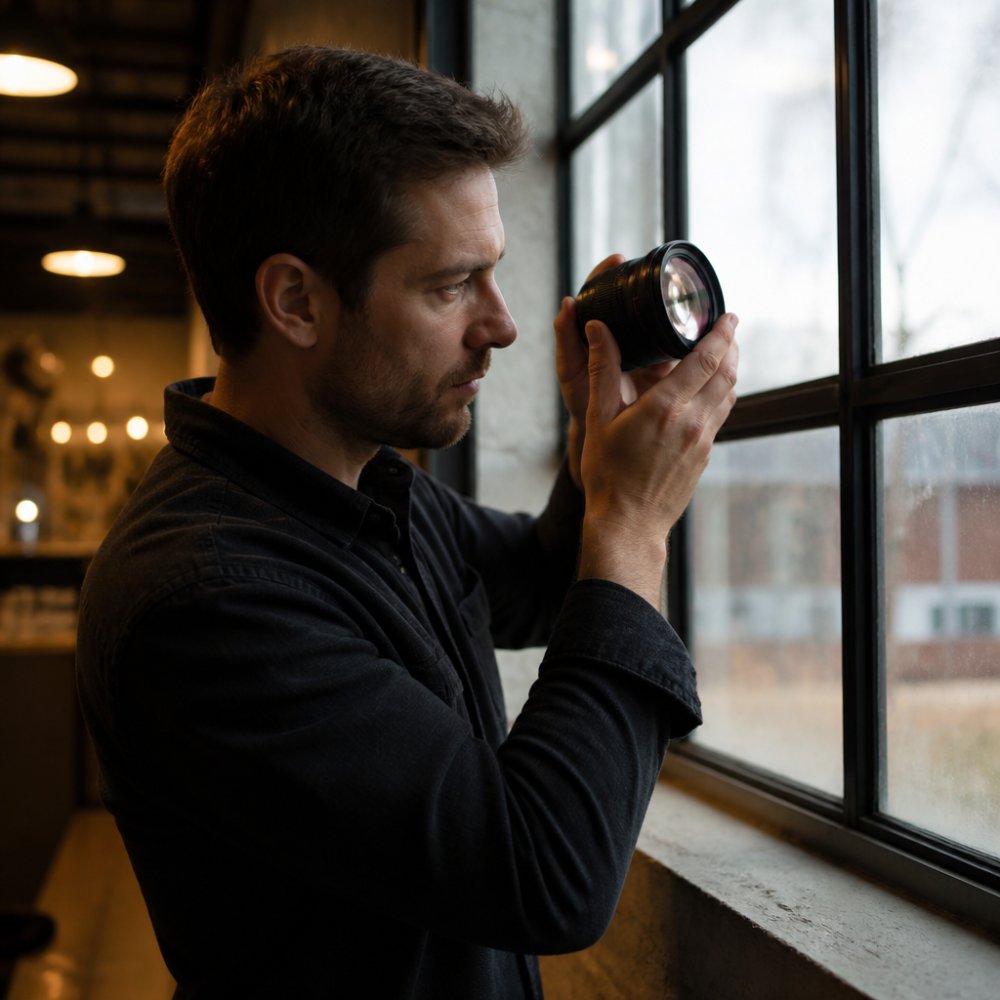
Shine a light through the glass at an angle. On the front element, small smudges wipe away. Scratches that catch the light and stay put are permanent.
The rear element matters more. Damage here sits close to the sensor and shows up in images far more easily. Check both surfaces for coating damage, cleaning marks, and chips at the edge.
Step 3: Test Rings, Aperture and Electronics
Turn the focus ring and zoom ring through their full travel. Both should move smoothly, with no grinding, catching, or loose play. Then fire the aperture: set different f-stops and watch the diaphragm blades open and close cleanly and evenly.
Finally, check the electronic contacts on the mount. They should be clean and unbent. Mount the lens, switch the camera on, and confirm the body reads the lens and reports the aperture.
How to Check a Lens for Fungus, Haze and Internal Dust
Learning how to check a lens for fungus takes one tool: a small torch. Shine it through the lens from the rear and look along the barrel. Fungus appears as fine, branching threads, like tiny roots. Haze looks like a grey film or fog across an internal element. Both soften contrast and can spread.
Internal dust is different. Almost every used lens has a few specks, and they rarely show in photos. The line to draw is simple: loose dust is normal, while fungus, haze, or separation (a milky ring where cemented elements meet) is a defect. If you see any of those three, walk away.
What Is Harmless, What Warrants a Discount, What Is a Deal-Breaker
Most used-lens anxiety comes from not knowing which internal flaws actually matter. Here is a severity framework to consider when inspecting a lens.
Harmless (no price impact):
- A few loose dust specks, especially near the edges of an element
- Minor coating marks on the front element that do not catch a torch beam
- Light cleaning swirls on the front surface
Warrants a discount (negotiate, do not walk):
- A visible scratch on the front element that catches light at an angle but sits outside the central image area
- Moderate internal dust concentrated in one spot
- Faint coating wear on the rear element that does not scatter a torch beam
- Slight play in a zoom ring or a stiff focus ring that still turns smoothly
Deal-breaker (walk away):
- Branching fungus anywhere inside the barrel
- Haze or fog across an internal element
- Separation, the milky ring where cemented groups meet
- A scratch or chip on the rear element, which sits close to the sensor and shows up easily
- Oil on the aperture blades, which can spread and cause sticking
Sample-Image Symptoms to Look For
The torch tells you what is inside. Test shots tell you whether it matters. Shoot a plain bright surface, such as a white wall or an overcast sky, at a small aperture like f/11 or f/16, then boost contrast on the file. Here is how the symptoms map to the cause:
- Soft, low-contrast images across the whole frame, likely haze or a hazy coating
- A bright, veiling flare when shooting into a light source, often haze or internal dust scattering light
- A localized soft spot or smudge that stays in the same place across apertures, could be a rear-element scratch or a fungus colony
- A faint ring or halo in out-of-focus highlights, possible separation in a cemented group
- Dark specks that appear only at small apertures, internal dust, usually harmless unless dense
A single dust speck will not ruin a photo. A hazy element will flatten every image you take with that lens, and no amount of editing brings contrast back cleanly.
Fungus can spread to your other lenses through shared storage. Never park an affected lens in the same bag or cabinet as your clean glass. If you buy a lens with early fungus anyway, isolate it and have it serviced before it goes near your kit.
Bring a small LED torch and a clean microfiber cloth to every viewing. Shine the torch from the rear mount at a low angle and rotate the lens slowly. Dust glints and moves; fungus and haze stay put and look like a film or a root system.
How to Test Autofocus on a Lens Before You Pay
To test autofocus on a lens, point it at a high-contrast target and run it from close focus to infinity several times. Autofocus should lock quickly and quietly, without hunting or squealing. A grinding or buzzing focus motor is a warning sign, especially on older screw-drive designs.
Then check accuracy, not just speed. Take a test shot wide open at the widest aperture and zoom in on the result. The point you focused on should be sharp. If it sits slightly off, the lens may need calibration on your body, which is a cost and a hassle.
If the lens has image stabilization, switch it on and listen. You should hear nothing unusual, and the viewfinder image should steady. Test manual focus too: the ring should feel smooth and precise, with no slip.
Camera Lens Compatibility: Mounts, Adapters and Electronics
Camera lens compatibility is where quiet mistakes happen. A lens can fit a body and still not work properly. First match the lens mount to your camera mount, such as Sony E, Canon RF, Nikon Z, Fujifilm X, or Micro Four Thirds.
Adapters widen your options, but they are not equal. A plain adapter keeps manual lenses usable but cuts autofocus and aperture control. A smart adapter can restore electronics, yet performance varies by brand and firmware.
A Pre-Purchase Compatibility Check
Before you agree to meet or pay, run this five-point check. It takes two minutes and prevents most bad buys.
- Mount match. Confirm the lens mount and your camera mount are the same, or that a known adapter exists for the pair. Do not assume a mount name on a listing is accurate; ask for a photo of the mount itself.
- Sensor coverage. A full-frame lens on a smaller sensor is fine. The reverse can crop your images or vignette badly. If the lens was designed for a smaller format, expect a crop factor and check whether that suits your framing.
- Autofocus support. Screw-drive lenses need a body with a built-in focus motor, or a smart adapter that provides one. Mirrorless bodies often lose autofocus entirely with older screw-drive glass unless the adapter is specifically designed for it.
- Aperture control. Some adapters and older lenses have no electronic aperture control, so you may be stuck at one f-stop or forced to focus wide open. Confirm whether the aperture ring is physical or electronic.
- Stabilization. In-body stabilization and in-lens stabilization can conflict on some systems. Check whether the lens has a stabilization switch and whether your body expects one.
Adapter Limitations at a Glance
| Adapter type | Autofocus | Aperture control | Stabilization | Typical use |
|---|---|---|---|---|
| Plain (dumb) adapter | None | None (manual ring only) | None | Manual-focus lenses on mirrorless bodies |
| Smart adapter, electronic | Yes, varies by firmware | Yes | Varies | Modern autofocus lenses on a different mount |
| Speed booster / focal reducer | Yes, if electronic | Yes, if electronic | Varies | Smaller-sensor bodies wanting full-frame coverage |
| Screw-drive adapter | Yes, if adapter has a motor | Yes | Varies | Older autofocus lenses on mirrorless bodies |
Firmware matters as much as hardware. A smart adapter that worked perfectly on one camera model may misbehave on another after a body firmware update. Before buying, search for the adapter model plus your camera model and read recent user reports. If the seller is using the same adapter and body, ask them to demonstrate autofocus and aperture changes on a video call.
Electronics and Communication Checks
Once the lens is on your body, confirm the body reads it correctly:
- Does the camera report the correct focal length and aperture?
- Does autofocus work, or only manual focus?
- Do the camera’s exposure modes behave as expected?
- Are there known firmware issues with your camera model and this lens?
A lens that reports the wrong focal length will still take photos, but it will confuse in-body stabilization and EXIF data. A lens that will not communicate aperture at all limits you to wide-open shooting or manual stop-down, which is a real workflow change.
Compatibility is not a yes-or-no question. It is a checklist of mount, coverage, autofocus, aperture, and stabilization. Verify each one before you pay, and get the seller to demonstrate the ones you cannot test yourself.
When in doubt, ask the seller for the exact model number and check the maker’s compatibility notes. A five-minute check beats a return shipping argument later.
Reading the Seller: Profile, Serial Number and Description
A seller profile tells you more than any single photo. Look for a history of camera gear sales, clear feedback, and listings that read like they were written by someone who knows the gear. Vague descriptions and stock photos are a reason to slow down.
Ask for the serial number and compare it with the photos. A serial number confirms the lens is the model claimed and helps you check its age and origin. On the description, watch for phrases like „sold as seen“ or „no returns,“ which shift the risk onto you.
A common mistake is trusting a condition grade without reading what it covers. „Excellent“ can mean flawless glass or simply „works.“ Ask directly: any fungus, haze, or scratches on the glass? Any dents near the mount? Get the answer in writing before you pay.
Test Shots That Reveal What Your Eyes Miss
Your eyes catch a lot, but test shots catch the rest. Bring your own camera body and a memory card, and shoot at the widest aperture, where flaws show most. Then review the files on a laptop, not just the camera screen.
Run this short set:
- A textured wall or brick surface, to spot softness and decentering
- A bright sky at a small aperture, to check for dust spots and sensor-facing issues
- A backlit subject, to look for haze and flare
- A close subject at minimum focus, to test focus accuracy
- The same scene at several apertures, to compare sharpness across the frame
Check image quality at the edges, not only the center. A lens that is sharp in the middle but mushy at the corners may have been dropped or badly serviced. Sharpness and focus accuracy are the two things you cannot fix later.
Shoot a plain white wall at a small aperture and boost contrast on the file. Internal dust, haze, and coating damage jump out in seconds.
Buying Remotely: Shipping, Returns and Buyer Protection
Remote buys are where buyer protection earns its keep. Ask for fresh, dated photos of the glass, the mount, and the serial number. Request a short video of the focus ring turning and the aperture firing. A serious seller will happily provide both.
Confirm the return policy in writing before you pay. Check who covers shipping if the lens arrives with a fault, and how long you have to test it. Pay through a method with buyer protection, and keep the listing and messages as a record.
On arrival, inspect the lens the same day and run your test shots. If something is wrong, report it fast, within the stated window. A warranty from a dealer adds peace of mind, though private sales usually come as-is.
Used Lens Pricing, Condition Grades and Negotiation
Used lens pricing follows condition, but not in a straight line. Mint copies command a clear premium, while a well-used but optically clean lens is often the best value. Compare a few listings for the same model to see the real range before you make an offer.
Condition grades are a starting point, not a verdict. Read what each grade covers, then weigh the glass and mechanics over cosmetic wear. A scuffed barrel with perfect optics beats a pretty lens with a soft corner any day.
Negotiation is normal. Name a specific flaw you found and propose a fair figure. Sellers respect a buyer who has done the homework. If the price will not move and the flaws bother you, that is your answer.
| Decision | When it applies | What to do |
|---|---|---|
| Pass (buy) | Clean glass, smooth rings, sharp test shots | Pay and keep the receipt |
| Negotiate | Cosmetic wear, minor dust, high asking price | Cite the flaw, offer a lower figure |
| Walk away | Fungus, haze, separation, dented mount, dead AF | Leave it, however good the price |
Pass, Negotiate or Walk Away: The Final Decision
The final call comes down to three questions: is the glass clean, do the mechanics work, and do the test shots hold up? If all three pass, buy with confidence. If one is shaky, negotiate or walk.
Here is how we would decide. A lens with light wear and clean optics is a pass, even at a firm price. A lens with cosmetic scuffs and a soft corner is a negotiate, priced down to match. A lens with fungus, haze, or a dead autofocus motor is a walk away, no matter how tempting the deal.
That discipline is the whole game. Used lenses reward buyers who inspect with a method and stay patient. A little caution at the viewing saves a lot of regret later.
Our free plan lets you start exploring today. Get started with Kameratalk and buy your next lens with a clear head.
Frequently Asked Questions
What should I check first when buying a second-hand lens?
Start with the glass, because optical damage is the one flaw you cannot fix cheaply. Shine a light through the front and rear elements and look for scratches, coating wear and smudges. Then check the interior for dust, haze or fungus, and only after that move on to the mechanical parts: focus ring, zoom ring, aperture blades and electronic contacts. A clean used lens with smooth mechanics is a far better buy than a cosmetically perfect one with cloudy glass.
How do I check a used lens for fungus or haze?
Hold the lens against a bright light source and look through it from both ends at an angle. Fungus shows up as branching, thread-like patterns, often near the edges of internal elements. Haze looks like a uniform milky film that dulls contrast. Both sit inside the lens and cannot be wiped off. If you see either, walk away: cleaning usually means a full disassembly, and fungus can etch the coating permanently.
How can I test autofocus on a used lens before buying?
Mount the lens on your own camera body and shoot a series of test shots at different distances: close focus, mid-range and infinity. Listen for grinding or squealing from the focus motor, and watch whether the lens hunts repeatedly before locking on. Switch between single and continuous autofocus, and test manual focus override if the lens supports it. Then review the images at 100% on a computer, not just the camera screen.
How do I know a used lens is compatible with my camera?
Check three things: the physical mount, the electronic communication and the image circle. The mount must match your camera system, or you need a proven adapter. Electronic contacts must line up so autofocus, aperture control and image stabilization work. And a lens built for a smaller sensor will vignette heavily on a full-frame body. Bring your own camera body to any in-person inspection and confirm all of this before money changes hands.