Table of Contents
- What Lens Fungus Is and Why Vintage Lenses Are Vulnerable
- What Does Lens Fungus Look Like? Visual Signs to Recognize
- Lens Fungus vs Dust: How to Tell the Difference
- How to Check a Camera Lens for Fungus: Step-by-Step Inspection
- Where Fungus Grows Inside a Lens and How Humidity Fuels It
- Does Fungus Affect Image Quality and Cause Permanent Damage?
- Vintage Lens Inspection Checklist for Buyers and Sellers
- What Not to Do When You Find Fungus in a Lens
- Prevention and Storage: Keeping Fungus Out of Your Gear
- Conclusion
- Frequently Asked Questions
Last Updated: October 20, 2026
What Lens Fungus Is and Why Vintage Lenses Are Vulnerable
Lens fungus is a living growth that feeds on the coatings and glass inside a camera lens. It starts as spores, settles in the dark, and spreads slowly. Vintage lenses are the classic target because they sit unused for years in cupboards and cellars.
Why do older lenses suffer most?
- Old coatings are softer. Early anti-reflective layers scratch and hold moisture more easily.
- Storage habits were different. Leather cases and closed cupboards trap damp air.
- Lenses sit unused. A lens in a drawer for five years never gets light or airflow.
The spores are everywhere already. They only need the right conditions to settle and grow. Your job is to spot the signs of fungus in vintage camera lenses before the growth etches the glass.
What Does Lens Fungus Look Like? Visual Signs to Recognize
Lens fungus looks like fine white or grey threads inside the glass. The pattern is web-like, branching, and often silvery when you tilt the lens toward light. It sits inside the lens, not on the surface, so wiping the front element does nothing.
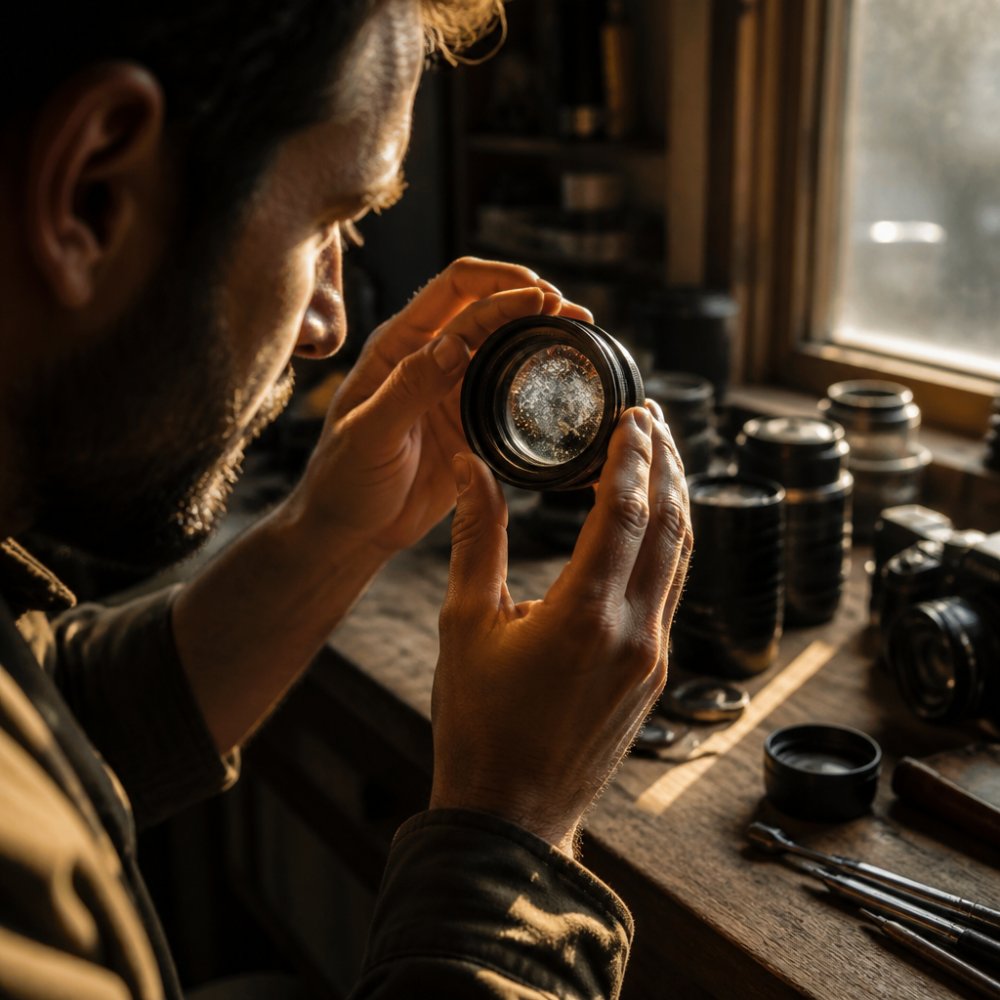
Here is what to look for:
- Web-like spots that branch out like tiny roots
- Silvery growth that catches the light at an angle
- Small patches near the edges of an optical element
- A faint haze that will not clean off
- Dots that grow into threads over months
The tricky part is that early growth is almost invisible head-on. You need angled light to see it. That is why so many buyers miss it at first glance.
Lens Fungus vs Dust: How to Tell the Difference
Lens fungus and dust look similar until you move the light. Dust sits as separate specks with sharp edges. Fungus forms connected threads and spreads in a branching pattern. Scratches are straight lines. Coating damage looks like rainbow patches.
A quick comparison:
| Feature | Fungus | Dust | Scratches | Coating Damage |
|---|---|---|---|---|
| Shape | Branching threads | Separate specks | Straight lines | Rainbow patches |
| Location | Inside glass | Surface or inside | Surface | Surface layer |
| Moves with light | Yes, glows | No | Slight | Shifts colour |
| Cleans off | No | Yes | No | No |
A common mistake is judging a lens under flat room light. Tilt it toward a window and rotate it slowly. Fungus glows and shifts; dust just sits there.
If the mark cleans off with a cloth, it was dust. If it stays and looks silvery, treat it as growth until proven otherwise.
How to Check a Camera Lens for Fungus: Step-by-Step Inspection
You can check a camera lens for fungus in about five minutes with a torch and a dark room. The method works on any lens, but it matters most for vintage glass where growth hides deep inside. What most guides skip is the specific angles, aperture settings, and viewing positions that actually reveal growth, so here is the full procedure, not just the highlights.
What you need
- A small LED torch (a phone light works, but a narrow-beam torch is better)
- A dark room with no overhead light
- A clean microfibre cloth (to rule out surface dust first)
- A white sheet of paper or a plain wall to use as a backdrop
The inspection routine
- Work in a dim room. Bright light washes out the fine threads. Turn off overhead lights and let your eyes adjust for 30 seconds.
- Clean the outside first. Wipe the front and rear elements with a microfibre cloth so surface dust does not get mistaken for internal growth.
- Set the aperture wide open. On a vintage lens with a manual aperture ring, turn it to its widest setting (the smallest f-number). This opens the iris and lets you see deeper into the barrel. On an automatic lens, mount it on a body and set the widest aperture in manual mode.
- Shine the torch from the rear, angled off-axis. Hold the torch behind the lens and tilt it about 30-45 degrees off the optical axis. Do not shine it straight through, direct light flattens the view and hides the very threads you are trying to find.
- Look through the front element and rotate the lens slowly. Watch for silvery, branching threads that catch the light as the lens turns. Fungus glows and shifts; dust stays put.
- Tilt the lens until light rakes across the glass at a low angle. A grazing angle is where early growth becomes visible. Sweep the torch slowly from one side to the other.
- Repeat from the other end. Shine the torch through the front and look through the rear. Front and rear elements each tell a different story, and growth near the rear element is easy to miss.
- Check the edges of each element. Fungus often starts near the barrel wall where moisture collects. Rotate the lens and look at the outer third of the glass, not just the centre.
- Open the focus to both ends of its range. On a vintage prime, rack focus from minimum to infinity and watch for growth that appears only at one setting, it can sit on an internal element that moves.
- Document what you see. Photograph the lens through the torch at the angle where the growth is clearest. This is useful for a seller’s description, a service quote, or a before/after record.
Do not shine a torch directly into your eye through the lens. Angle it across the glass instead. Direct light hides the very threads you are trying to find, and it is uncomfortable.
Inspection by lens type
- Vintage manual primes: easiest to inspect. Set the aperture ring wide open, rack focus through its range, and check both ends.
- Vintage zooms: inspect at both ends of the zoom range. Growth can sit on a moving group that is only visible at one focal length.
- Automatic lenses: mount on a body, set the widest aperture in manual mode, and use focus peaking or magnification if your camera has it.
- Rangefinder and fixed-lens cameras: you may not be able to see through both ends. Inspect through the front only and treat any internal haze as suspect.
What most guides miss is the rear element. Growth there affects image quality far more than growth at the front, and it is easy to ignore. A lens that looks clean from the front can still be a problem from behind.
Where Fungus Grows Inside a Lens and How Humidity Fuels It
Fungus grows where moisture collects: between lens elements, near the edges, and around the aperture blades. These are the spots with the least airflow and the most trapped damp. Warm, dark storage turns them into a greenhouse.
The conditions that fuel growth are simple:
- High humidity in the storage space
- Warm temperatures that speed up growth
- Darkness, since light slows fungus down
- No ventilation around the lens
- Long periods unused
A leather case in a closed cupboard is the worst combination. It holds damp air against the glass and blocks every bit of light.
Fungus needs three things: moisture, warmth, and darkness. Remove any one of them and growth stalls. Ventilation and light are your cheapest defences.
Does Fungus Affect Image Quality and Cause Permanent Damage?
Yes, fungus affects image quality, and yes, it can cause permanent damage. Early growth may only soften contrast slightly. Later growth scatters light, lowers sharpness, and leaves a visible haze in backlit shots. The real danger is what it leaves behind.
Fungus feeds on the lens coating and can etch the glass itself. Even after the growth is killed, the marks stay. That is why early detection matters so much.
Watch for these image symptoms:
- Lower contrast across the frame
- Hazy or milky look in strong backlight
- Soft corners that were once sharp
- Flare that spreads more than it should
On vintage lenses, the coating is often the first casualty. Once it is eaten away, no cleaning brings it back.
Vintage Lens Inspection Checklist for Buyers and Sellers
Buying a vintage lens online is a gamble unless you inspect properly. Use this checklist before you pay, and run the same one before you sell so you can describe the lens honestly.
- Ask for photos taken with a torch at an angle
- Request close-ups of the front and rear elements
- Ask specifically about internal growth and haze
- Check the aperture blades for sticky residue
- Confirm the lens was stored dry and ventilated
- Inspect in person if you can, torch in hand
- Price the risk of servicing into your offer
For sellers, honesty pays. A lens described as „may have faint internal marks“ sells faster than one returned for a hidden problem.
What Not to Do When You Find Fungus in a Lens
The worst move is to attack the lens yourself with household products. Here is what to avoid:
- Do not use vinegar, bleach, or alcohol soaks. They damage coatings and seals.
- Do not scrub hard. You will scratch the coating before you remove the growth.
- Do not open the lens unless you know the optical assembly. You will lose alignment.
- Do not store it with your other gear. Spores spread.
- Do not leave it in a sealed bag. That traps moisture and speeds growth.
Storing a fungus-affected lens next to clean glass is how one problem becomes five. Isolate it in a ventilated spot until it is serviced.
For anything beyond a faint mark, professional servicing is the safe route. A technician can disassemble, clean, and reassemble without wrecking the alignment.
Prevention and Storage: Keeping Fungus Out of Your Gear
Prevention comes down to dry air, airflow, and light. Keep your gear out of damp cellars and sealed cases. Let air move around each lens. Use the lens, or at least air it out now and then. But ‚keep it dry‘ is not a plan, here are the measurable targets and the trade-offs that actually matter for vintage glass.
The humidity target
Most practitioners aim to keep stored gear in the 40-50% relative humidity range. Below about 40% you risk drying out lubricants and leatherette; above about 60% you are in the zone where fungus thrives. A cheap digital hygrometer, the kind sold for reptile tanks or humidors, costs very little and tells you more than any sealed cabinet ever will.
- Under 40% RH: safe from fungus, but vintage lubricants can stiffen over years.
- 40-50% RH: the sweet spot for most vintage lenses.
- 50-60% RH: watch it. Growth is slow but possible in warm spells.
- Above 60% RH: treat as a problem. Ventilate, dehumidify, or move the gear.
Ventilation vs. sealing
A sealed cabinet feels safe but traps whatever moisture is inside when you close the door. A ventilated shelf lets damp air escape. The trade-off is dust: open shelving collects it, so use lens caps and a light dust cover rather than airtight bags.
- Open shelf in a dry room: best airflow, some dust.
- Ventilated cabinet with a hygrometer: good balance for a collection.
- Sealed case with silica: works only if you swap the silica regularly and check the hygrometer.
- Leather case in a cupboard: the worst combination. Leather holds moisture against the glass and blocks light.
Add a silica pack to your camera bag, but swap it out regularly. A saturated pack stops absorbing and starts holding moisture against your gear. Rechargeable silica (the kind that changes colour) makes this easy to track.
Vintage-specific storage rules
- Air lenses out every few months. Take them out of cases, remove caps, and let them sit in a dry room for a few hours.
- Exercise the aperture and focus rings. Working the mechanics moves air through the barrel and discourages growth in the gaps.
- Avoid long-term leather storage. Leather cases are for transport, not for years in a cupboard.
- Let in some light where it is safe. Light slows fungus. A shelf that gets indirect daylight is better than a dark drawer.
- Isolate anything suspect. A lens with faint growth should not sit next to clean glass. Spores spread.
- Check your gear with a torch twice a year. A five-minute sweep in spring and autumn catches growth before it etches.
You do not need special equipment. A cheap hygrometer and an open shelf beat an expensive sealed cabinet that traps damp. The goal is not a sterile box, it is a stable, dry, ventilated space where vintage glass can sit without feeding anything.
Conclusion
Fungus is patient. It waits in the dark, feeds on damp, and etches glass slowly enough that you miss it until the damage is done. The signs of fungus in vintage camera lenses are subtle, but a torch and five minutes will find them.
Check before you buy. Check before you store. Isolate anything suspicious and get it serviced.
Spend five minutes with a torch rather than a fortune replacing etched glass. Start for free and browse our guides to keep your vintage gear clean, dry, and ready to shoot.
Frequently Asked Questions
How can you tell lens fungus from dust or haze?
Dust sits on the surface or as distinct specks and usually wipes away. Lens fungus grows inward from the edges as branching, web-like filaments or silvery patches that follow the glass. Haze is a uniform milky film caused by lubricant vapor or coating breakdown. Shine a flashlight through the lens at an angle: fungus looks thread-like and rooted, dust looks loose, and haze looks evenly cloudy across the whole element.
Can you remove fungus from a lens without opening it?
Surface fungus on the front or rear element can sometimes be cleaned with a soft cloth and a lens-safe cleaning solution. Growth between internal lens elements cannot be reached without disassembly. Attempting to open a lens yourself risks misaligning optical elements and damaging coatings. For internal growth, professional servicing is the safer route, and a technician can also confirm whether the coating has already been etched.
What should you do if a vintage lens has fungus?
Stop using it in humid conditions and isolate it from your other gear. Inspect the full lens interior with a flashlight to judge severity. Light surface growth may respond to careful cleaning, while internal growth needs professional servicing. If the fungus has etched the coating, image quality may already be affected. When buying, treat any visible growth as a reason to negotiate or walk away.
Can fungus in a lens damage the camera or affect image quality?
Fungus does not spread to the camera body, but it can spread to nearby lenses stored in the same humid space. Image quality suffers most when growth sits near the optical center or has etched the coating, causing reduced contrast and flare. Early, edge-only growth may barely show in photos. Because damage can become permanent, treat any signs of fungus in vintage camera lenses as a prompt to act quickly.